Reservation Stage
Issuing Reservation
Description:
After the "Propose" step, the next action is to issue a reservation.
Responsible Party: Sales Agent
Result:
After issuing a reservation, there is automation in place to create an opportunity request to get approval.
Flowchart:

Opportunity Request Approval
Description:
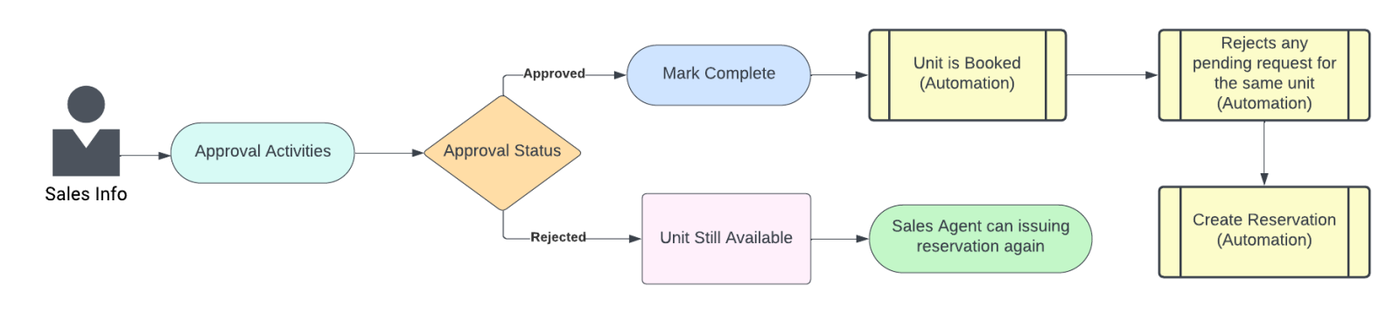
After issuing the Opportunity Request, approval is required to complete the process.
Responsible Party: Sales Info
Result:
-
In case sales info approves the request, the unit status will change to "Booked". There is automation in place to reject any pending reservation requests for the same unit.
-
If the request is rejected, the unit remains available, and the sales agent can re-issue the reservation again.
Flowchart :
Submit Reservation To ERP
Description:
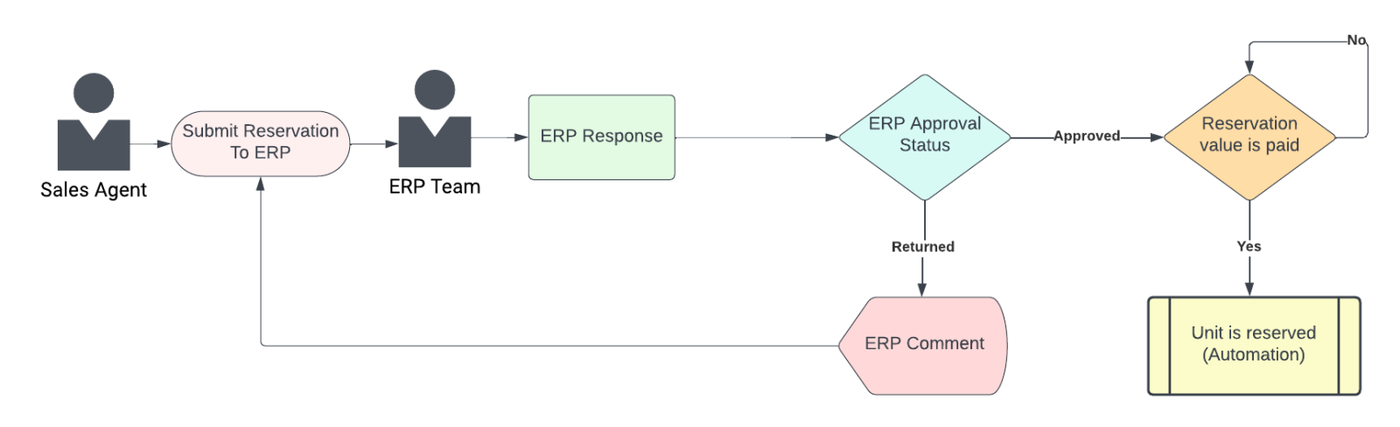
Submit reservation to the ERP system, to take approval.
Responsible Party: Sales Agent, ERP Team
Result:
- In case ERP approves the request and marks that the reservation value is paid, there is automation in place to reserve the unit.
- If the request is returned with a comment, the sales agent can re-send it to ERP.
Flowchart: