Contract Amendment
New Contract Amendment
Description:
Creating a contract amendment like "Finished Unit".
Responsible Party: Contract Team
Result:
After creating a contract amendment, you need to choose or create a pricing sheet for this amendment.
Flowchart:

New Pricing Sheet
Description:
Create a pricing sheet for the contract amendment.
Responsible Party: Contract Team
Result:
After creating the pricing sheet for the contract amendment, you need to fill out the amendment sheet and send it to the finance team.
Flowchart:

Send Pricing Sheet to Finance
Description:
Fill the Amendment sheet with installments to send to the finance team.
Responsible Party: Contract Team
Result:
After sending the pricing sheet to finance, waiting for their approval status to continue the process.
Flowchart:

Finance Pricing Sheet Approval
Description:
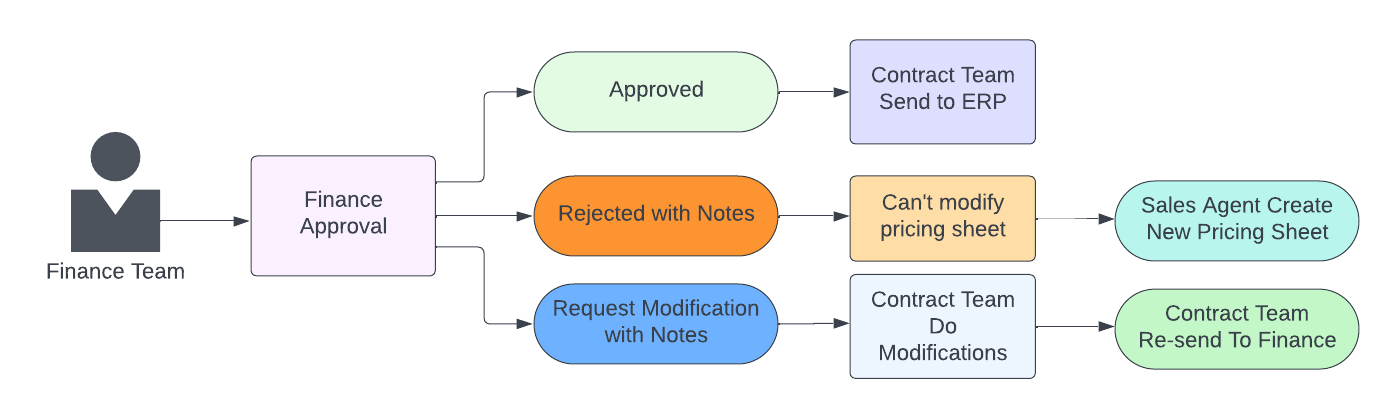
After the sales agent sends a request to the finance team, the finance team can grant approval based on the status. Depending on the approval status, the sales agent will either continue with the process or create another pricing sheet.
Responsible Party: Finance Team
Result:
- If the finance team approves the request, the sales agent can proceed to send it to ERP. In case of rejection with a note, the sales agent will create another pricing sheet and resend it.
- If the request requires modifications, the sales agent will make the necessary changes and send it again.
Flowchart:
ERP Pricing Sheet Approval
Description:
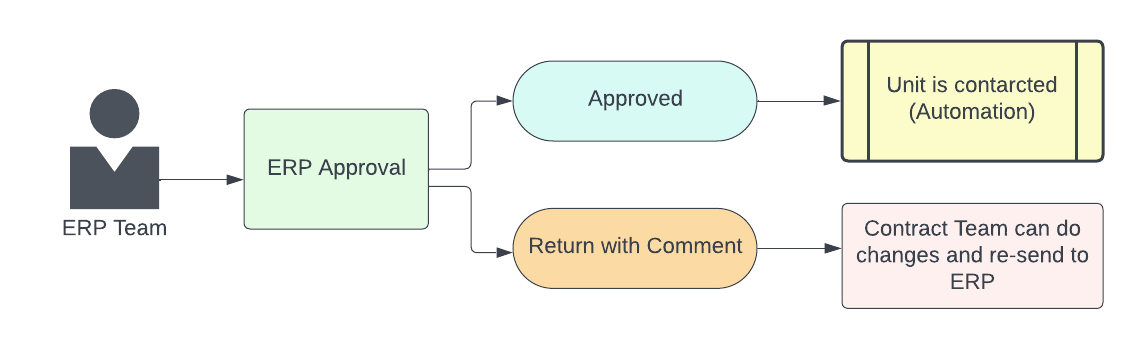
ERP makes approval for the pricing sheet to complete the contract amendment process.
Responsible Party: ERP Team
Result:
- If the ERP team approves, there is automation in place to make the pricing sheet for amendment approval.
- If the ERP returns with a comment, the sales agent will make the changes and resend it to the ERP again.
Flowchart: