Contract
New Pricing Sheet
Description:
In the sales agreement step, the sales agent creates a new pricing sheet with the 'Contract' type.
Responsible Party: Sales Agent
Result:
A pricing sheet is created, and then the pricing sheet needs to be modified.
Flowchart:

Payment Overview
Description:
After creating the pricing sheet in the payment overview, proceed to complete the modified sheet by entering the relevant amount. Verify that the NVP in the modified sheet matches that of the original sheet, and then save the changes.
Responsible Party: Sales Agent
Result:
After the sales agent sends the pricing sheet to finance, the finance department can set the approval status to "Approved", "Rejected", or "Request for Modification".
Flowchart:

Send the pricing sheet to the finance
Description:
After saving the modified sheet, you have the option to enter any applicable Discount, Interest, or Club Value. To send the pricing sheet to finance, click on "Send To Finance".
Responsible Party: Contact Team
Result:
After the sales agent sends the pricing sheet to finance, the finance department can set the approval status to "Approved", "Rejected", or "Request for Modification".
Flowchart:

Finance Pricing Sheet Approval
Description:
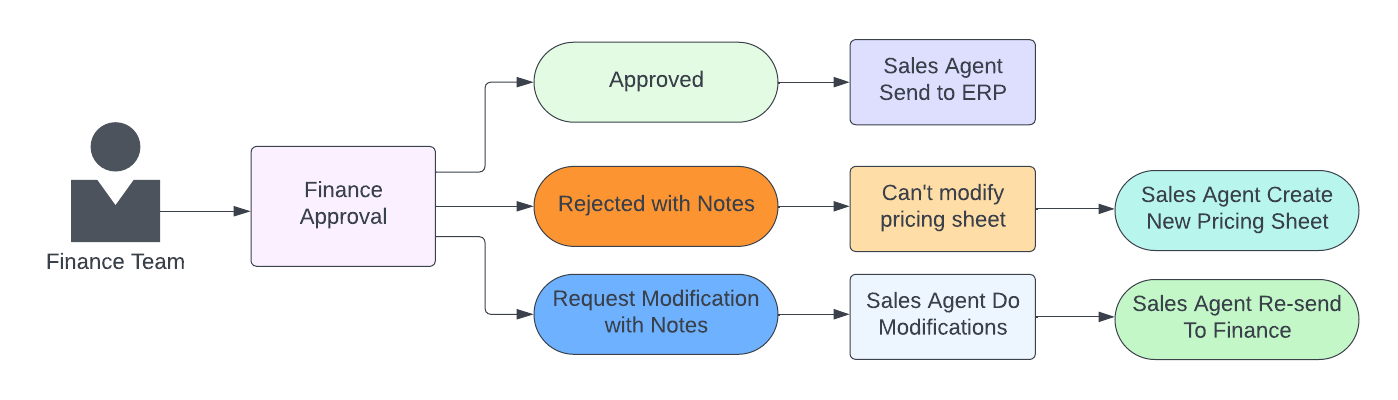
After the sales agent sends a request to the finance team, the finance team can grant approval based on the status. Depending on the approval status, the sales agent will either continue with the process or create another pricing sheet.
Responsible Party: Finance Team
Result :
- If the finance team approves the request, the sales agent can proceed to send it to ERP.
- In case of rejection with a note, the sales agent will create another pricing sheet and resend it.
- If the request requires modifications, the sales agent will make the necessary changes and send it again.
Flowchart:
ERP Pricing Sheet Approval
Description:
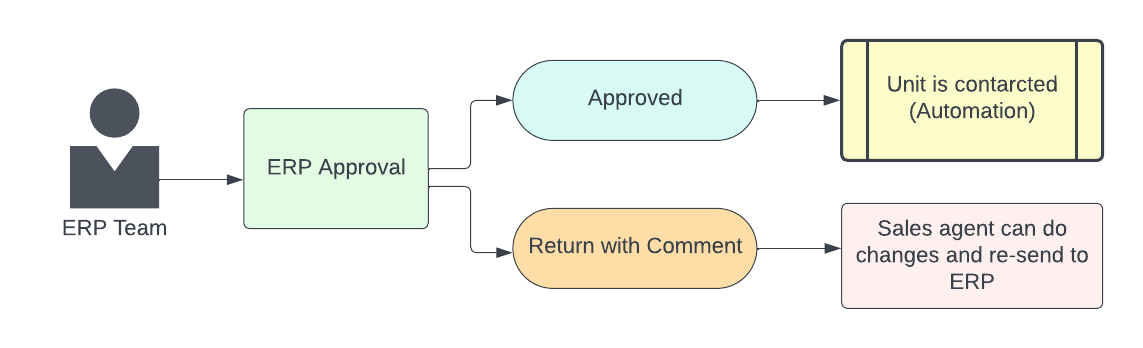
ERP makes approval for the pricing sheet to complete the contract process.
Responsible Party: ERP Team
Result :
- If the ERP team approves, there is automation in place to change the unit to a contracted status.
- If the ERP returns with a comment, the sales agent will make the changes and resend it to the ERP again.
Flowchart: